
.png)
Description
Download AudioCraft – Free AI Audio Generation Tool for Music, Sound Effects & Voice
Overview
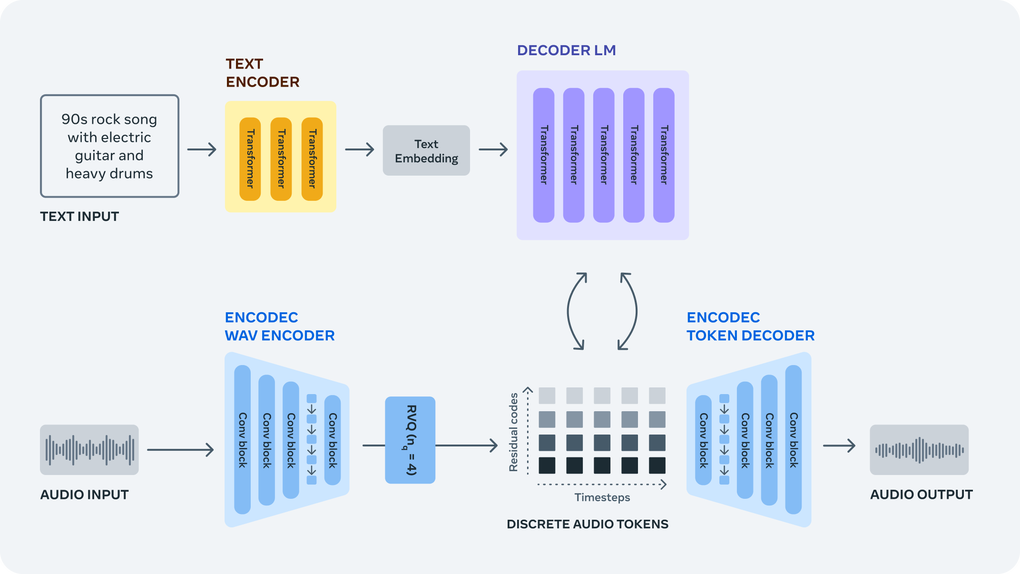
AudioCraft is Meta’s free, open‑source AI audio platform that turns plain‑text prompts into high‑quality music tracks, realistic sound effects, and efficiently compressed audio files. By integrating three cutting‑edge models—MusicGen for composition, AudioGen for environmental sounds, and EnCodec for neural compression—the service delivers a “one‑stop shop” for creators who need quick, royalty‑safe audio without the expense of traditional DAWs or hiring musicians. The web portal is deliberately minimal: users type a prompt, select a few optional parameters, and receive a downloadable WAV or MP3 in seconds. Because the backend runs on Meta’s GPU clusters, even modest hardware can generate professional‑grade results, while power users can clone the repository and run the models locally for offline work or deeper research. AudioCraft’s open‑source license (Apache‑2.0) encourages developers to adapt the models, contribute improvements, and even train custom versions on proprietary datasets. The platform is ideal for game developers needing placeholder ambience, podcasters seeking catchy intros, educators demonstrating audio synthesis, and researchers exploring neural audio generation. With generous free‑tier limits and a roadmap that includes longer compositions and visual prompting, AudioCraft positions itself as the most accessible AI‑driven audio creation tool on the market today.
Key Features & Capabilities
AudioCraft bundles three powerful AI engines into a single, cohesive experience, allowing creators to move fluidly between music composition, sound‑effect synthesis, and file compression without juggling multiple tools. The following list outlines the core capabilities that make the platform stand out, and each bullet point is elaborated to provide a clear picture of what users can achieve.
- MusicGen – AI‑driven composition: Generates multi‑instrumental tracks from simple descriptors such as genre, mood, tempo, and key. The model is trained on a curated, royalty‑free dataset, ensuring that each output is both original and musically coherent.
- AudioGen – Text‑to‑sound synthesis: Produces realistic environmental noises and Foley effects from concise prompts. Users can fine‑tune length, intensity, and spatial characteristics, making it perfect for game ambience or podcast sound beds.
- EnCodec – Neural audio compression: Provides real‑time compression with bitrate control, achieving up to an 8× size reduction while preserving near‑lossless fidelity, ideal for streaming or mobile deployment.
- Web‑based interface: No installation is required for basic usage; a modern browser on any OS (Windows, macOS, Linux, Android, iOS) is sufficient to generate and download audio instantly.
- Open‑source codebase: All three models are released under Apache‑2.0, allowing developers to inspect, modify, and integrate the technology into custom pipelines or research projects.
- Batch processing & API access: Advanced users can script bulk generations via a RESTful API, automating the creation of large sound libraries for games or simulations.
- Cross‑DAW compatibility: Exported audio files import seamlessly into popular DAWs (Ableton Live, FL Studio, Logic Pro) and game engines (Unity, Unreal), streamlining workflow integration.
- Community‑driven improvements: A vibrant GitHub community contributes model checkpoints, bug fixes, and new features, ensuring continuous evolution of the platform.
Installation, Compatibility & Pros / Cons
AudioCraft is designed to be accessible for beginners while still offering depth for power users. The service works out‑of‑the‑box in any modern browser, but developers who require offline capabilities or custom integrations can run the models locally. Below are the two primary usage paths, followed by system compatibility details and a balanced look at strengths and weaknesses.
Web Interface (Zero‑Installation)
- Navigate to AudioCraft’s portal and sign in with a Meta account.
- Select the desired module—MusicGen, AudioGen, or EnCodec—from the main dashboard.
- Enter a clear, descriptive prompt (e.g., “Calm acoustic sunrise, 70 BPM, major key”).
- Adjust optional settings such as duration, sample rate, and compression bitrate.
- Press “Generate.” The request is queued on Meta’s GPU cluster and typically returns within seconds to a few minutes.
- Download the result in WAV or MP3 format and import it directly into your project.
Local Installation (Developers & Researchers)
For offline work or deep customization, clone the repository and follow the standard Python setup. The process assumes a Linux or macOS environment with Python 3.9+ and a CUDA‑compatible GPU for optimal speed.
- Clone the repo:
git clone https://github.com/meta/audiocraft.git && cd audiocraft - Create and activate a virtual environment.
- Install dependencies via
pip install -r requirements.txt. - Download model checkpoints with
python scripts/download_models.py. - Generate audio using the provided CLI, for example:
python generate.py --model musicgen --prompt "Lo‑fi chillhop beat, 90 BPM" --duration 30 --output chill.wav. - Compress with EnCodec if needed, and optionally launch the Flask API for programmatic access.
- Windows users can employ WSL or Docker (see
docker-compose.yml) to replicate the Linux environment.
AudioCraft’s web version runs on any modern browser across Windows 10/11, macOS, Linux, Android, and iOS. The local installation supports Linux, macOS, and Windows (via WSL/Docker). Minimum requirements for local execution are 8 GB RAM, a CUDA‑compatible GPU (NVIDIA GTX 1060 or better), and at least 10 GB free disk space for model files.
Pros
- Free & open‑source: No licensing fees for personal, academic, or commercial use.
- All‑in‑one platform: One UI for music, effects, and compression reduces tool switching.
- High‑quality output: Neural compression preserves nuance while reducing file size.
- Scalable architecture: Cloud generation for quick bursts; local mode for offline control.
- Extensible API: Seamlessly integrate into pipelines, games, or research workflows.
Cons
- Technical learning curve: Full feature set requires familiarity with command‑line tools and Python.
- GPU dependency for local runs: CPU‑only generation is markedly slower.
- Commercial licensing limits: High‑volume enterprise use may need a paid agreement with Meta.
- Prompt sensitivity: Slight wording changes can dramatically affect results.
- Web‑tier quota: Free tier imposes daily generation limits that may constrain heavy users.
Frequently Asked Questions
Is AudioCraft truly free for commercial projects?
Yes. The core models are released under an Apache‑2.0 license, which permits commercial use without royalties. The hosted web service has usage quotas, and large‑scale commercial deployments may require a paid plan or self‑hosting of the open‑source version.
What audio formats can I export from AudioCraft?
The web interface offers WAV (44.1 kHz, 16‑bit) and MP3 (up to 320 kbps). When using EnCodec locally you can also export Opus, FLAC, or custom‑bitrate MP3 files.
Can I fine‑tune the models on my own dataset?
Absolutely. The repository includes training scripts for MusicGen and AudioGen. You’ll need a sizable GPU cluster and a well‑curated audio dataset to achieve meaningful fine‑tuning results.
How does EnCodec differ from traditional codecs like MP3?
EnCodec is a neural codec that learns a compact latent representation of audio, allowing up to 8× compression while preserving subtle timbral details that conventional codecs often discard. It also supports real‑time encoding/decoding, which is useful for interactive applications.
What’s on the roadmap for future AudioCraft updates?
Meta plans to add multi‑instrument separation, longer‑form compositions (up to 10 minutes), and a visual prompt interface that lets users sketch waveforms. Community contributions also drive many upcoming features.
Conclusion – Start Creating Audio Instantly with AudioCraft
AudioCraft democratizes high‑quality sound generation by consolidating three state‑of‑the‑art AI models into a single, free platform. Whether you are a game developer needing immersive ambience, a podcaster looking for a catchy jingle, or a researcher exploring neural audio synthesis, the tool offers a secure, scalable, and open‑source solution. The web interface removes any barrier to entry, while the open‑source codebase provides the flexibility required for advanced experimentation and integration. Regular updates from Meta and an active community ensure that the platform will continue to improve in fidelity, speed, and creative control. If you’re ready to turn simple text prompts into professional‑grade audio without costly licenses or complex setups, download AudioCraft today and start creating.
Guides & Tutorials for AudioCraft
How to install AudioCraft
- Click the Preview / Download button above.
- Once redirected, accept the terms and click Install.
- Wait for the AudioCraft download to finish on your device.
How to use AudioCraft
This software is primarily used for its core features described above. Open the app after installation to explore its capabilities.
User Reviews for AudioCraft 0
No reviews found




